Emoji Up genmoji sticker maker
- 4.2
- Rating
- 1.00M
- Installs
- Free
- Price
 Analysis by App-foxy
I started using Emoji Up genmoji sticker maker because I wanted something more expressive than the standard emoji keyboard without turning every message into a design project. It is a free personalization app from Mobile entertainment s.r.l., built around custom emoji, stickers, GIFs, fonts, themes, and a keyboard experience. After spending time with it, I see it less as a complete replacement for every keyboard and more as a playful layer for people who enjoy changing the tone of everyday chats.
The appeal is easy to understand in a shared household. One person might want bright stickers for a group chat, another may prefer unusual fonts, while someone else only cares about creating a funny reaction quickly. The app gathers those ideas in one place instead of making you switch between a sticker app, a GIF search, a font tool, and the phone’s regular keyboard. That convenience is its strongest argument.
At the same time, I would not install it automatically on every family device. A personalization keyboard can affect how people type, what they see while choosing content, and how comfortable they feel using it. The right choice depends on whether the user wants creative extras or simply needs a fast, familiar keyboard. My experience was positive overall, but the app makes more sense when each person chooses it for themselves rather than when it is treated as a household default.
You May Also Like

 Blood Strike: 2.5 Anniversary
Blood Strike’s Loadouts Turn Every Drop Into a Tactical Gamble
A close look at Blood Strike’s custom loadouts: how fast access to signature weapons reshapes its battle royale rhythm, rewards preparation, and narrows the gap between fights.

 Pandora - Music & Podcasts
Pandora’s Music Is Easy to Start, but Harder to Recover
Pandora’s strength is its low-effort path from a seed to a station. Its weak spot is how much confidence it asks you to place in connection, setup, and quiet recovery.

 8 Ball Pool
 Is Built on Rivalries, Rematches, and Routine
A close look at the rivalries, rematches, shared routines, and unanswered safety questions that turn a quick pool match into a persistent mobile community.

 Samsung Music
’s Quiet Strength Is Playing What You Already Own
Its reach comes less from spectacle than from dependable access to a personal library. That simplicity is both the app’s strongest retention engine and its ceiling.

 AccuWeather: Weather Radar
AccuWeather Review: A Quick, Clear Forecast for Everyday Decisions
For everyday plans, the best forecast is the one you can understand quickly. AccuWeather makes rain timing, radar, and local conditions easy to act on, with a few trade-offs.

 Hill Climb Racing
Why Hill Climb Racing Still Turns Crashes Into One More Run
A tiny car, a bumpy hill and one more upgrade: Hill Climb Racing keeps resurfacing because its simple chaos makes every near-miss feel personal.
More From Our News Desk



How Emoji Up fits into everyday shared-device use
When I think about using Emoji Up on a phone that several people share, I find it helps to treat keyboard customization as a personal choice rather than a permanent device setting. A quick check before handing the phone over can prevent someone else’s theme or typing preferences from becoming a surprise. That small habit also makes it easier to decide which creative features belong in everyday chats and which are better left for occasional use.
A practical example: one phone, several communication styles
Imagine a household tablet or a phone that is regularly passed between family members. A parent may use it to reply to a family conversation, a teenager may want a dramatic sticker or GIF, and a younger user may enjoy the visual side of emoji and themes. Emoji Up can make that kind of informal use more entertaining because the same keyboard area can serve different moods.
In my experience, the useful part is not just having more symbols. It is being able to choose between several forms of expression without leaving the conversation. A quick emoji works for a short reply, a sticker can carry a stronger reaction, and a GIF may be better when a static image feels too plain. Fonts and themes add a visual change to the typing experience, although they are more about personality than efficiency.
That flexibility is particularly handy in family group chats, where the same message may need different tones. A simple “okay” can sound cold in text, while a friendly emoji or sticker softens it. I also found the creative tools more suitable for casual conversations than for work messages, school notices, or anything where clarity matters more than style.
There is a small but important trade-off here: shared use can become confusing if several people change the keyboard’s appearance or preferences. Someone who likes a colorful theme may leave the next user wondering why the keyboard suddenly looks different. I would treat the app as a personal customization choice, even if the device itself is shared.
What the app brings together
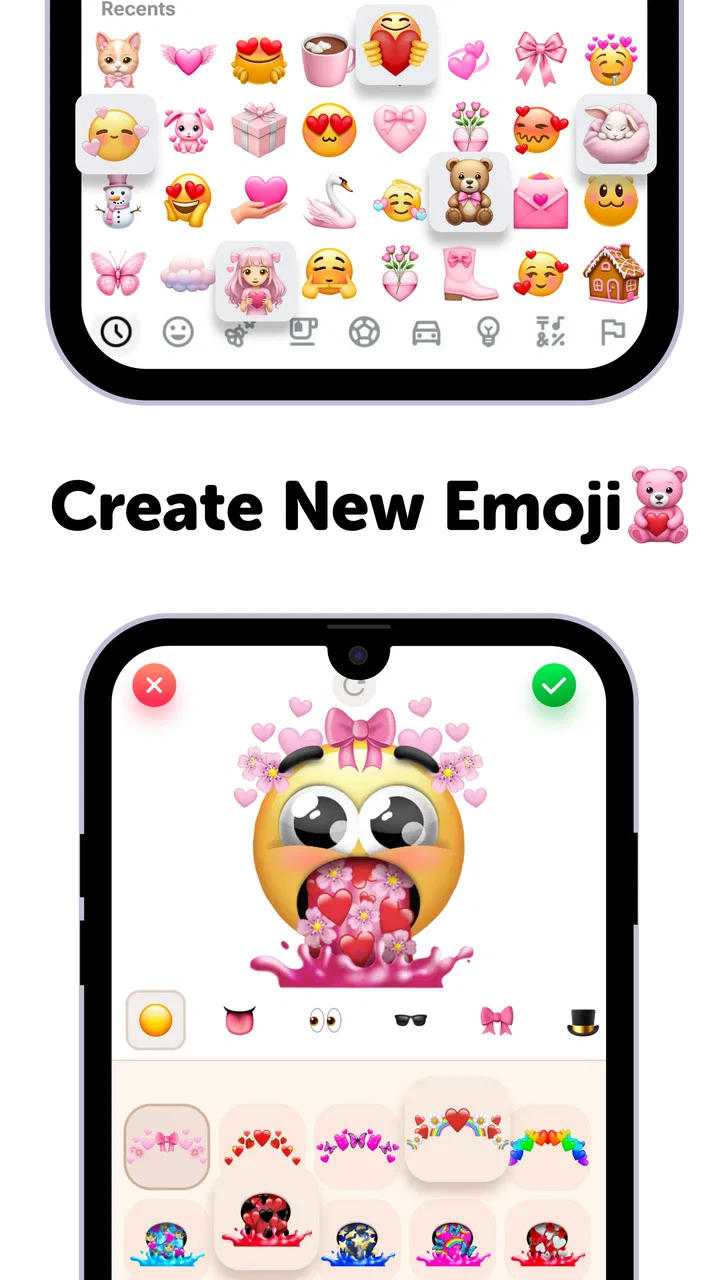
The store summary points to AI emoji, Genmoji, cat mystery games, GIFs, fonts, themes, and a keyboard. In practical terms, that makes the app feel broader than a simple sticker picker. The creative side is the main attraction, while the keyboard gives those creations a direct route into messaging.
I especially like the idea of using the app when a conversation has a running joke. Instead of searching through the same standard emoji repeatedly, I can look for a more specific visual response. A cat-themed reaction, an exaggerated face, or a playful GIF can make a familiar exchange feel less repetitive.
The AI-oriented features are best approached as a source of ideas rather than a guarantee that every result will match the exact image in your head. Creative tools often work well when the request is simple and visual, but they can feel less satisfying when you want a very precise character, expression, or composition. I would experiment with short, clear concepts before spending time trying to force a complicated result.
The cat mystery games also change the rhythm of the app. They are not the reason I would choose a keyboard, but they give the experience a small entertainment angle. That may appeal to someone who enjoys browsing and unlocking the playful side of an app rather than opening it only when a message needs a sticker.
Setting it up without taking over the phone
Emoji Up supports devices running Android 7.0 or later, so it is aimed at a wide range of Android phones and tablets. The setup decision I would think about first is whether to use it as an occasional creative tool or as the everyday keyboard. Those are not the same commitment.
If you mainly want stickers, GIFs, or generated emoji, start by exploring those areas before changing your normal typing habits. This lets you judge whether the content is useful without immediately making the keyboard part of every message. If you do decide to use the keyboard, spend a few minutes checking how it feels for ordinary typing, not just for selecting decorative content.
On a shared device, I would also make the boundary clear: the app should be enabled only when the person using the device understands that it changes the typing experience. A parent may be comfortable with the visual features but prefer the standard keyboard for passwords, addresses, or formal writing. Switching back when necessary is a sensible routine rather than a criticism of the app.
Another practical tip is to separate experimentation from important conversations. Try new themes, fonts, and AI emoji in a casual chat or notes area first. That makes it easier to see whether the result is readable and whether the keyboard behaves as expected before using it in a message where mistakes would be awkward.
Keeping personal boundaries clear on a household device
Emoji Up is a personalization app, not a household coordination system. I would not expect it to manage separate family profiles, enforce individual preferences, or create a clear boundary between one person’s customizations and another’s. That means the household has to provide the coordination itself.
For a shared phone, the simplest approach is to agree on who changes the keyboard and when. If the device belongs mainly to one person but is occasionally borrowed, that person should remain the final decision-maker about themes, keyboard settings, and purchases. If several people use it equally, keeping the standard keyboard available makes the arrangement less frustrating.
This matters because personalization can look harmless while still affecting routine use. A font that is fun in a chat may be tiring for longer typing. A busy theme may reduce visual comfort. A creative panel may be useful to one person and distracting to another. The best setup is not necessarily the most colorful one; it is the one that does not slow down the people who use the device for practical tasks.
I also recommend checking the purchase flow before letting a child browse freely. The app is free to install, but it includes in-app purchases ranging from $0.99 to $35.99 per item. That does not mean a purchase will happen automatically, but it does mean the household should decide who is allowed to buy anything and under what approval process.
Coordination between creative and practical use
One of the app’s less obvious strengths is that it can support different communication jobs in the same day. In the morning, I might want a quick standard message. Later, I may want a GIF for a friend or a custom emoji for a family joke. Having those options close together reduces the need to install several narrowly focused apps.
The weakness is that more options can also create more browsing. When I am in a hurry, the regular keyboard is usually faster because I already know where everything is. Emoji Up becomes more valuable when I have a few extra seconds to choose something with personality. That distinction helps set realistic expectations: it adds expressive range, but it does not automatically improve typing speed.
For household coordination, I would use it selectively. Keep the standard keyboard for addresses, appointments, school communication, and work. Use Emoji Up for family chats, celebrations, informal reminders, and creative exchanges. This division lets the app do what it does well without making every message visually busy.
A useful workflow is to create or choose expressive content before writing the full message. Decide whether the conversation needs a sticker, GIF, or emoji, then type the text around that choice. This avoids repeatedly opening and closing panels while trying to compose a sentence, and it keeps the visual element from becoming an afterthought.
Age context and trust
The app carries an Everyone content rating, which makes its general positioning suitable for a broad audience. Still, an age label should not replace supervision or common sense, especially when children use a shared device. The presence of creative tools, games, and purchases means adults should remain aware of how the app is being used.
For younger users, I would focus on the creative side and explain that not every generated image or online-style reaction is appropriate for every conversation. The app can encourage experimentation, but children may need help understanding when a joke, sticker, or GIF could embarrass someone or be misunderstood.
For teenagers, the main conversation is likely to be about spending and privacy habits rather than whether the visual content is entertaining. I would make sure they know which account or device is being used for any purchase and that they should ask before buying an item. Clear expectations are more useful than assuming the app itself will manage family boundaries.
Adults may appreciate the app as a way to make routine communication warmer, but they should also consider whether a third-party keyboard fits their comfort level. Some people are happy to use a specialized keyboard; others prefer the familiar system keyboard for sensitive or formal typing. In that case, Emoji Up can still be useful as a creative companion without becoming the default input method.
Trust also includes knowing when not to use a feature. I would avoid relying on decorative text or generated emoji when the recipient needs an unambiguous instruction. A colorful reaction can be fun in a family chat, but it is not a substitute for clear wording when arranging pickups, sharing times, or discussing something important.
How it compares with the usual alternatives
The standard phone keyboard remains the better choice for speed, reliability, and everyday text entry. It is already familiar, usually integrates cleanly with the device, and does not ask the user to explore a separate creative layer. If your priority is typing messages quickly with ordinary emoji, Emoji Up may feel unnecessary.
Dedicated sticker or GIF apps can also be stronger when you want a very focused library. They may offer a more specialized browsing experience, while Emoji Up’s broader approach asks you to move among emoji, themes, fonts, GIFs, and other playful elements. I prefer Emoji Up when I want variety in one place, but I would choose a dedicated tool for a narrow fandom or a highly specific visual collection.
AI image and emoji tools can provide more control when customization is the main goal. Emoji Up is more convenient for casual messaging because it connects creativity with a keyboard-oriented experience. The trade-off is that convenience may come with less precision than a full creative editor.
Theme and font apps are another comparison point. Those apps may be better for someone who wants to redesign the appearance of a phone or focus on typography alone. Emoji Up makes more sense for a person who wants those touches alongside expressive messaging. Its value comes from the combination, not from being the deepest tool in any single category.
Performance expectations and everyday friction
The app has reached over a million installs and holds a 4.3 average from around seventeen thousand ratings, with hundreds of written reviews. Those figures suggest a substantial user base and generally favorable reception, but they should not be treated as a promise that every phone or household will have the same experience.
My main caution is that a feature-rich personalization app can feel busier than a basic keyboard. The more time I spent browsing themes, fonts, GIFs, and creative options, the more I noticed that the app rewards curiosity rather than minimalism. That is enjoyable when I am in the mood to customize, but less appealing when I simply need to answer a message.
The current version is 3.9.8, and the app was released on July 16, 2020. For someone deciding whether to keep it installed, the important question is not its age but whether the current feature mix still fits the way they communicate. I would test it during ordinary use for several days instead of judging it only from the first colorful session.
Another point is storage and attention. Even when an app is free, it can occupy a place in the user’s routine. If the keyboard makes typing feel slower or if the creative panels are rarely used, the standard keyboard may be the better long-term option. Conversely, someone who regularly sends stickers and GIFs may find that consolidating those habits is worth the extra layer.
Who should install it, and who should skip it
I would recommend Emoji Up to people who enjoy expressive messaging, like changing the look of their keyboard, and want AI emoji, Genmoji-style creativity, GIFs, fonts, themes, and playful content in one app. It is also a reasonable choice for families who use group chats heavily and want more ways to react than the built-in emoji set provides.
I would be more cautious for people who type long documents on a phone, depend on a very clean keyboard, or dislike changing familiar input habits. The app’s creative features may not compensate for the extra visual activity. Anyone who needs a highly specialized sticker collection may also prefer a dedicated alternative.
For a child or teenager, I would consider it only when an adult has already decided how purchases and keyboard changes will be handled. The Everyone rating is reassuring for general positioning, but it does not remove the need for age-appropriate guidance. Shared-device use works best when the family agrees on boundaries before the app becomes part of daily messaging.
My household verdict
Emoji Up works best as an optional creative keyboard rather than a mandatory replacement for the standard one. I like that it brings several expressive tools together and gives ordinary conversations more personality. The combination of custom emoji, GIFs, fonts, themes, and playful extras makes it more flexible than a plain emoji picker.
Its limitations are equally clear. It may feel too busy for people who value speed, and shared devices require users to coordinate their preferences manually. The free installation is attractive, but the available in-app purchases mean adults should establish spending rules, especially when children use the device.
My final recommendation is to install it when the household wants more visual creativity and is comfortable treating it as a personal choice. Keep the regular keyboard available for practical or sensitive typing, and use Emoji Up where expression matters more than efficiency. With that boundary, it becomes a fun addition instead of a source of confusion.
For casual, expressive messaging, Emoji Up is worth trying; for a distraction-free keyboard, the usual built-in option remains the smarter choice.
FAQs for Emoji Up genmoji sticker maker
01What is Emoji Up genmoji sticker maker used for?
Emoji Up genmoji sticker maker is an application that allows users to create personalized emojis and stickers. You can design unique characters by combining different facial features, accessories, and expressions. This app is perfect for adding a personal touch to your messages and social media posts.
02Is Emoji Up genmoji sticker maker free to use?
The app offers a free version with basic features that allow you to create and use custom emojis. However, there may be in-app purchases available for additional features, such as exclusive design elements or an ad-free experience. Check the app store for specific pricing details.
03Can I use my custom emojis created in Emoji Up genmoji on all messaging platforms?
While you can create custom emojis in the app, compatibility with messaging platforms depends on each platform's support for third-party emojis. Generally, you can share your created stickers and images on most social media and messaging apps by using the app's sharing function.
04Is Emoji Up genmoji sticker maker safe to download?
Yes, Emoji Up genmoji sticker maker is safe to download from reputable app stores like Google Play or the Apple App Store. Ensure that you regularly update the app to the latest version to benefit from security patches and new features. Always check user reviews for additional insights.
05Does Emoji Up genmoji sticker maker require an internet connection?
Creating emojis and using the basic features of Emoji Up genmoji can be done offline. However, an internet connection may be required for downloading updates, accessing additional features, or sharing your creations directly through the app. Check the app settings for specific offline capabilities.
Pros
- Easy to create custom emoji stickers.
- Wide variety of templates available.
- User-friendly interface design.
- Quick sharing with messaging apps.
- Supports high-resolution exports.
Cons
- Limited free features; in-app purchases.
- Occasional ad interruptions.
- Requires internet for full features.
- No option for animated stickers.
- Limited skin tone variations.

Emoji Up genmoji sticker maker
Gallery